
 Use Manual Charge to charge a battery using user-selectable parameters including voltage, current, or time.
At any time during the test, tap  to return to the previous screen; or
  to return to the Main Menu.
- Connect the charger clamps to the appropriate battery posts.
- At the Main Menu, tap Manual Charge. The Select User screen is displayed. Select your user to continue.
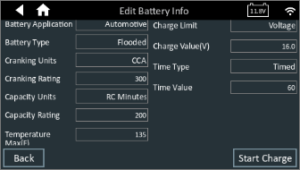
- The Edit Battery Information screen is displayed. Select your battery information and charging parameters by tapping on the corresponding box to edit the parameters, then select Start Charge to begin the charge.
4. The charger goes through a series of steps to determine the overall condition of the battery before applying a charge.
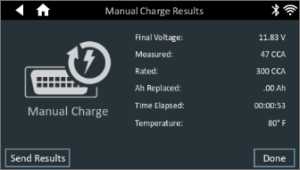
5. The test results are then displayed on the charger screen.
6. Tap Done to return to the Main Menu.